
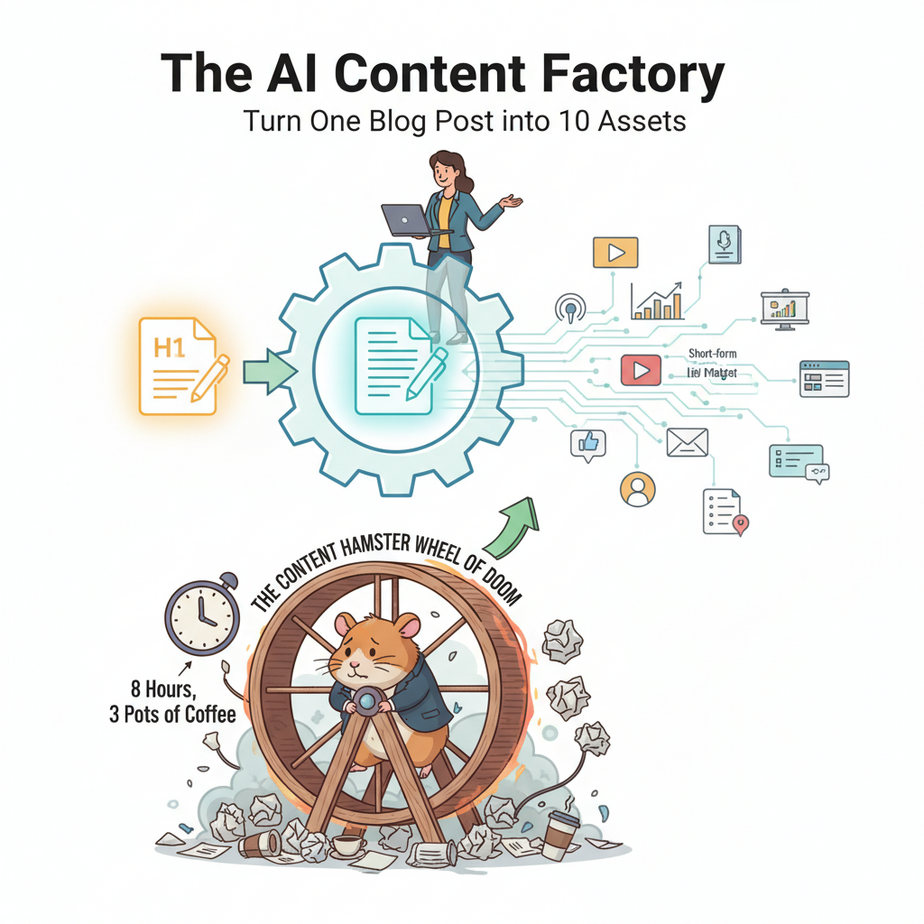
The Content Hamster Wheel of Doom
You did it. You wrote the perfect blog post. It’s insightful, well-researched, and took you eight hours and three pots of coffee. You hit ‘publish,’ share it once on Twitter, and… crickets. A week later, it’s buried under a pile of internet noise, and you’re already stressing about what to write next week.
This is the content hamster wheel. You run and run, creating and creating, but you never seem to actually get anywhere. The ROI on your effort feels pathetic. You know you *should* be turning that one brilliant post into a dozen smaller assets, but who has the time? You’d need a team of junior marketers, and the last one you hired just scheduled a tweet about your B2B SaaS product with 17 cat emojis.
Today, we’re not just getting off the hamster wheel. We’re dismantling it and using the parts to build a rocket ship. We’re going to build a content repurposing factory that runs on AI, turning your single piece of hard work into a cascade of high-quality assets automatically.
Why This Matters
This isn’t about being lazy; it’s about being leveraged. The smartest marketers don’t create more content; they get more mileage out of the content they already have. Every blog post, every webinar transcript, every podcast episode is a gold mine of potential tweets, emails, and articles.
This automation builds a system to mine that gold for you. It’s about multiplying your impact without multiplying your effort.
This workflow replaces:
- A junior content marketer’s most tedious job.
- The 5 hours you waste every weekend trying to come up with social media posts.
- The guilt of knowing you should be promoting your old content but never do.
The business outcome: Maximum visibility for every piece of content you create, consistent social media presence, and more time spent on high-value work instead of low-value copy-pasting.
What This Tool / Workflow Actually Is
Claude 3 Sonnet: The Creative Intern
Think of Claude 3 Sonnet as the brilliant, creative, and slightly nerdy intern who actually follows instructions perfectly. It’s a large language model from a company called Anthropic. It’s exceptionally good at understanding nuance, adopting different tones of voice, and—most importantly for us—outputting clean, structured data like JSON. It’s the brain of our factory, taking raw material (your article) and shaping it into finished goods.
Make.com: The Factory Conveyor Belt
Make.com (or Zapier, or n8n) is our automation platform. It’s the series of conveyor belts and robotic arms that move things through our factory. It watches for new raw material, carries it to the AI workstation, picks up the finished products, and sends them to the warehouse. It’s the glue that connects everything without a single line of code.
Google Drive: The Loading Dock
We need a simple way to tell our factory, “Hey, new job!” A dedicated Google Drive (or Dropbox) folder is the perfect, universal loading dock. When we drop a new text file into this folder, it’s the signal for the entire assembly line to roar to life.
Prerequisites
This is not rocket science, despite my earlier metaphor. If you can follow a recipe to bake a cake, you can build this. Here’s your ingredient list:
- An Anthropic API Account: They have a free tier to get you started. Go to console.anthropic.com and sign up. This is where we get our secret key to power the AI.
- A Make.com Account: The free plan is plenty to build and test this.
- A Google Drive Account: You already have one. Create a new folder named “AI-Repurposing-Input”.
- A Piece of Content: Find a blog post you’ve written, copy the text, and save it as a simple
.txtfile on your computer.
That’s it. No coding, no servers, no tears.
Step-by-Step Tutorial
Let’s assemble the factory. Follow along closely.
Step 1: Get Your Anthropic API Key
This is the key that starts the engine. Don’t share it.
- Log in to your Anthropic account.
- Click on your account icon/name in the top right and go to “API Keys”.
- Click “Create Key”. Name it something like “ContentFactoryBot”.
- Copy the key immediately. You won’t see it again. Store it in a temporary safe place.
Step 2: Set Up The Trigger in Make.com
We need to tell Make.com to watch our loading dock (the Google Drive folder).
- Create a “New scenario” in Make.com.
- Search for “Google Drive” and choose the trigger “Watch Files in a Folder”.
- Connect your Google Account. For the “Folder ID,” choose the “AI-Repurposing-Input” folder you created.
- Set the limit to 1 for testing.
- Upload your sample
.txtarticle to that folder in Google Drive. Then right-click the module in Make and choose “Run this module only” to pull in the file data.
Step 3: Download the File Content
The trigger only tells us a *new file exists*. We need another step to actually *read the text inside it*.
- Add another module. Search for “Google Drive” again, but this time select the action “Download a File”.
- In the “File ID” field, you don’t choose from a list. You map it from the previous module. Select the “File ID” variable from the “Watch Files” trigger.
Step 4: The Magic AI Prompt
This is where we give our AI intern its instructions. We’ll use the generic HTTP module for maximum control.
- Add a new module, search for “HTTP”, and choose “Make a request”.
- Fill it out precisely as follows:
URL:
https://api.anthropic.com/v1/messagesMethod: POST
Headers: (Add 3 headers)
- Item 1: Name =
x-api-key, Value =YOUR_ANTHROPIC_API_KEY - Item 2: Name =
anthropic-version, Value =2023-06-01 - Item 3: Name =
content-type, Value =application/json
Body type: Raw
Content type: JSON (application/json)
Request Content:
This is the big one. This is the master prompt. Copy and paste this ENTIRE block. The magic is in asking for a JSON object back.
{
  "model": "claude-3-sonnet-20240229",
  "max_tokens": 4096,
  "temperature": 0.5,
  "system": "You are an expert content repurposing assistant. Your task is to take a piece of text and generate a variety of content assets from it. You MUST respond with only a single, valid JSON object and nothing else. The JSON object should have the following keys: 'linkedin_post', 'tweet_thread' (an array of 3 short strings), 'email_newsletter' (a 150-word summary), and 'video_ideas' (an array of 5 strings).",
  "messages": [
    {
      "role": "user",
      "content": "Please repurpose the following article text:\
\
{{3.data}}"
    }
  ]
}
IMPORTANT: In the Make.com editor, delete {{3.data}} and map the `Data` field from the **Google Drive Download a File** module. This injects your article text into the prompt.
Finally, check the box for “Parse response”. This will automatically convert the AI’s JSON text response into usable data fields.
Complete Automation Example
Let’s finish the assembly line. Our goal is to take the structured JSON from Claude and save each piece of content into its own Google Doc for review.
- Modules 1, 2, 3: The Google Drive trigger, download, and HTTP request to Anthropic are already built.
- Add Module 4: Parse JSON. Even though we checked “Parse response” in the HTTP module, sometimes the response is a string that needs one more parsing step. Add a “JSON” module and choose “Parse JSON”. In the “JSON string” field, map the `Data` from the HTTP module. This ensures the data is clean and ready.
- Add Module 5: Router. Add a “Router” to split the workflow into multiple paths, one for each content type.
Path 1: Save the LinkedIn Post
- From the router, add a “Google Docs” module and select “Create a Document”.
- Title the document something like “LinkedIn Post for [Original File Name]”.
- In the “Content” box, map the `linkedin_post` variable from the “Parse JSON” module.
Path 2: Save the Tweets
- Add another path from the router with another “Google Docs” module.
- Title it “Tweets for [Original File Name]”.
- For the content, we want all three tweets. We can map them one by one:
{{4.tweet_thread[0]}}, then a new line, then{{4.tweet_thread[1]}}, and so on. (The number `4` will depend on your module order).
Path 3 & 4: Save Email & Video Ideas
- Repeat the process for the `email_newsletter` and `video_ideas`, creating a separate Google Doc for each.
Turn the scenario on. Now, drop a text file into your input folder and watch as four new, perfectly formatted Google Docs appear in your drive, filled with AI-generated content drafts. Your factory is open for business.
Real Business Use Cases
This isn’t just for bloggers. This pattern is a universal content multiplier.
- Podcast Producers: Drop an audio transcript file. The AI generates show notes, a promotional email for your list, a detailed summary for the website, and 5 quotes to turn into audiograms for social media.
- Sales Teams: Drop a long case study. The AI extracts key metrics, a testimonial quote, a short version for a sales email, and a LinkedIn post for the sales rep to share.
- Corporate Comms: Drop a press release. The AI generates an internal announcement for Slack, a public-facing summary for Twitter, and key talking points for executives.
- Online Course Creators: Drop a lesson transcript. The AI generates a quiz with multiple-choice questions, a summary worksheet for students, and a promotional email teasing the lesson’s content.
- YouTubers: Drop a video script. The AI generates a YouTube description with chapters and keywords, a blog post based on the script, and a series of community posts to promote the video.
Common Mistakes & Gotchas
- The “Garbage In, Garbage Out” Principle: If your source article is poorly written, disorganized, or boring, the repurposed content will be too. The AI is a multiplier, not a magician. Start with high-quality raw material.
- Not Being Specific in the System Prompt: The prompt is everything. If you just say “make a LinkedIn post,” you’ll get generic mush. If you say “make a 150-word LinkedIn post with a professional tone, two relevant hashtags, and a question to encourage comments,” you’ll get gold.
- Forgetting to Review: This is an automation for *drafting*, not for *publishing*. You are the human editor. The AI’s job is to get you 90% of the way there in seconds. Your job is the final 10% of polish, fact-checking, and strategic scheduling.
- API Costs: Anthropic’s API is very cheap, but it’s not free. Repurposing hundreds of massive documents will cost money. Be aware of your usage, but for a typical small business, the cost will be negligible compared to the time saved.
How This Fits Into a Bigger Automation System
This content factory is just one department in your larger automated business.
- Content Scheduling: Instead of creating Google Docs, the outputs could be sent directly to a Buffer or Hootsuite queue as drafts, waiting for your one-click approval.
- Project Management: Each repurposed asset could create a new task in Asana or Trello, assigned to a social media manager with a due date, ensuring nothing gets missed.
- Internal Collaboration: The generated content could be posted to a specific Slack channel, where your team can review, comment, and approve the drafts before they go live.
- Multi-Agent Workflows: The `video_ideas` from this workflow could become the input for a *second* AI agent whose only job is to write detailed video scripts for each of those ideas. This is how you chain automations together to create incredibly powerful systems.
What to Learn Next
Congratulations. You’ve built an engine that multiplies your creative output. You now have a system that ensures every piece of flagship content you create gets the maximum possible reach with minimum manual effort.
But creating drafts is only half the battle. What about distribution? How do we make sure this content actually gets seen by the right people at the right time?
In the next lesson, we’re going to connect this factory to the outside world. We’ll build an intelligent scheduling system that takes these generated assets and drip-feeds them across your social channels according to a smart schedule. We’re moving from content creation to automated content distribution.
You’ve built the content factory. Next, we build the global delivery network.
“,
“seo_tags”: “ai content repurposing, claude 3, make.com, content automation, marketing automation, business productivity, social media automation, no-code ai”,
“suggested_category”: “AI Automation Courses