
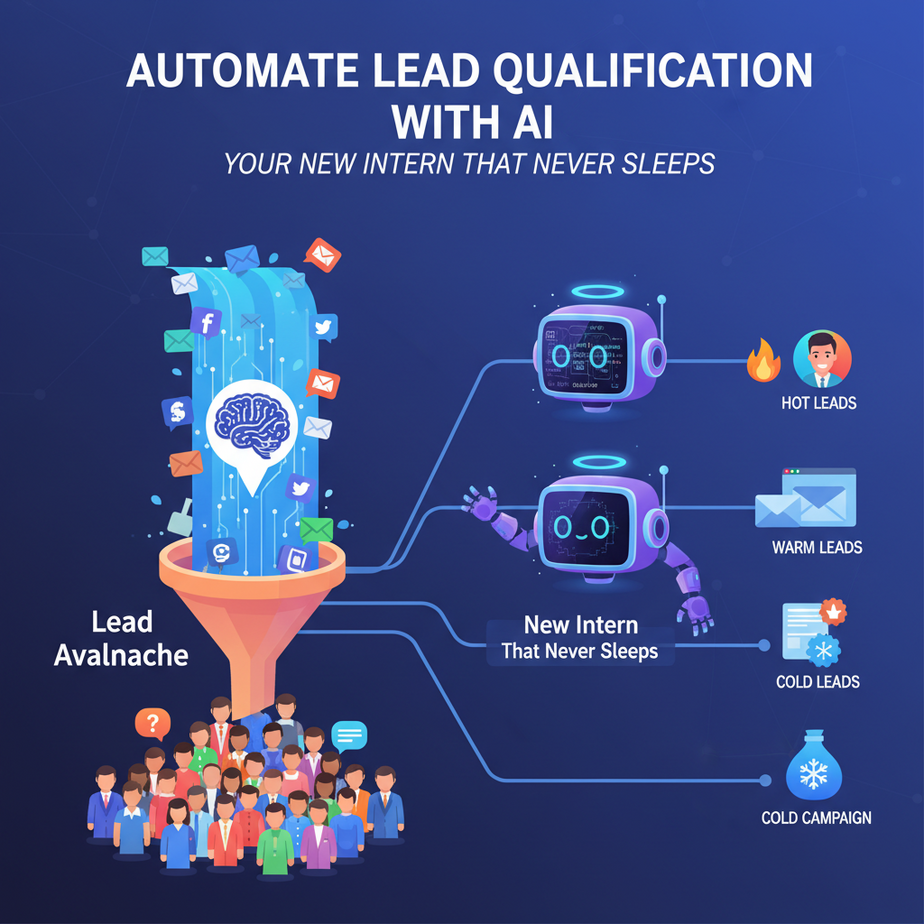
The Lead Avalanche
Picture this: Your inbox is like a waterfall of potential customers. Every day, dozens of people are checking out your business, asking questions, and sending those perfectly-formatted contact forms. It’s exciting, right?
Until you realize most of them are just tire-kickers, students, or people looking for free advice. Your salesperson spends 45 minutes a day manually opening each email, copying data into a spreadsheet, and trying to guess who’s actually worth a call. That’s not just tedious—it’s a revenue leak.
What if you had a digital intern that could sit by that waterfall, analyze every single drop, and say: “Boss, call these three people. The rest can wait.”
That’s what we’re building today. No coding required. Just a simple, powerful automation that turns a flood into a curated pipeline.
Why This Matters: From Chaos to Prioritized Calls
Lead qualification is the silent killer of small businesses. You’re drowning in leads, but your conversion rate is stagnant. Why? Because you’re treating everyone the same, which means you’re wasting prime time on low-intent inquiries.
Here’s the math:
- Time Saved: An average sales rep spends 3-5 hours/week sorting leads. That’s 10% of their selling time gone.
- Win Rate Increase: Prioritizing hot leads can boost your close rate by 20-30%. You’re not doing more work, just smarter work.
- Scale: When you launch a marketing campaign and get 100+ leads overnight, a human can’t keep up. An AI doesn’t blink.
- Sanity: Never miss a hot lead because it got buried under spam again.
It replaces: Manual inbox triage, spreadsheet entry, gut-feel decisions, and the constant fear of dropping the ball.
What This Tool/Workflow Actually Is
This isn’t some sci-fi robot. It’s a straightforward pipeline of logical steps:
What it IS:
- A Filter: It reads incoming lead info (from forms, emails, ads) using a simple AI model.
- A Scorer: It assigns a numerical score (0-100) based on signals like email address, job title, question quality, and company info.
- A Router: It takes action based on the score—maybe it sends a hot lead to your phone via SMS, adds a medium lead to a nurturing sequence, and archives the low ones.
- A Learner: The best systems can refine their scoring over time based on which leads you actually close.
What it does NOT do:
- It doesn’t make the first phone call (you’ll do that for hot leads).
- It doesn’t guarantee a 100% accurate score (it’s a probabilistic tool, not a crystal ball).
- It doesn’t replace your sales process—it enhances it.
Prerequisites: Zero Fear Zone
Look, if you can order a pizza online or set up a social media profile, you can do this.
What you need:
- A free Zapier account: This is the glue. We’re using it as a beginner-friendly visual workflow builder.
- An OpenAI API key: Free tier available. This is our AI ‘brain’. We’ll guide you to get one safely.
- 15 minutes of focus time: That’s it. No coding bootcamps required.
Reassurance: You will NOT break anything. We’re building a prototype you can test safely. If you can drag and drop a few boxes and paste an API key, you’re golden.
Step-by-Step Tutorial: Building Your AI Lead Qualifier
Let’s build a simple system that watches a Google Form (your lead magnet or contact form) and automatically scores the lead.
Step 1: Create Your Lead Form (5 minutes)
If you don’t have a live form yet, let’s make a placeholder. Go to Google Forms and create a simple one with these fields:
- Email Address (Short answer)
- Full Name (Short answer)
- Job Title (Short answer)
- Company (Short answer)
- What’s your biggest challenge? (Paragraph answer)
Submit a few test entries. For example, try: “john.doe@bigcorp.com”, “Senior Manager”, “ACME Inc.”, “We need to cut our cloud costs by 20%.” This is a hot lead. Another one: “student@gmail.com”, “Student”, “None”, “Learning for a project”. This is likely cold.
Step 2: Set Up Your Zapier Blueprint (The Easy Part)
- Sign up at zapier.com and create a new Zap.
- For the Trigger, search for “Google Forms” and select “New Form Entry.”
- Connect your Google account and pick the form you just created.
- Test the trigger to ensure Zapier can see your test submissions.
Why this step exists: This connects the ‘gate’ of your system. Every new lead is the trigger for your automated pipeline.
Step 3: Get Your OpenAI API Key (The Brain’s ID Card)
- Go to platform.openai.com/api-keys.
- Click “Create new secret key”. Give it a name like “Zapier Lead Scorer.”
- Copy the key immediately and save it in a safe place (like a password manager). Do not share it.
- For our free tutorial, you’ll need to add a payment method, but the cost for testing is literally a few cents.
Why this step exists: This key authorizes Zapier to call OpenAI’s models on your behalf.
Step 4: Create the AI Scoring Action (The Magic Wand)
- In your Zap, add an action. Search for “OpenAI” and choose “Send Prompt.”
- For the API Key, paste the key you just copied.
- Prompt is where we tell the AI what to do. This is the core. Paste the following exactly:
You are a sales lead qualification assistant. Given a lead's information, analyze it and provide a single, whole-number score from 0 to 100 for how likely they are to become a high-value customer.

Context:
- Lower scores indicate more junior roles, student emails, vague questions, or non-business companies.
- Higher scores indicate senior roles, business emails, specific challenges, and established companies.
- A score of 80+ is a 'Hot Lead' worth immediate sales follow-up.
- A score of 50-79 is a 'Warm Lead' for nurturing.
- A score below 50 is a 'Cold Lead' to be archived.

Lead Information:
- Name: {{Full Name}}
- Email: {{Email Address}}
- Job Title: {{Job Title}}
- Company: {{Company}}
- Challenge: {{What's your biggest challenge?}}

Analyze the lead's role seniority, company context, and challenge specificity. Provide ONLY the numerical score, no explanation.- Under Configuration, set the Model to “gpt-3.5-turbo” (it’s cheap and sufficient for this).
- Map the fields from your Google Form (e.g., `{{Full Name}}`) into the prompt placeholders.
Why this step exists: The prompt is your coach. It teaches the AI the exact criteria for scoring. The placeholders (`{{ }}`) are where Zapier inserts the live data.
Step 5: Add Routing Logic (The Traffic Cop)
- Add a new action: “Code by Zapier” (JavaScript).
- Paste this code to interpret the score and assign an action:
// Extract the score from the OpenAI response (which is a string)
const scoreText = inputData.ai_response;
const score = parseInt(scoreText.trim(), 10);

// Initialize output
let action, priority, message;

if (score >= 80) {
  action = 'Priority Call';
  priority = 'High';
  message = `HOT LEAD! Call ${inputData.full_name} at ${inputData.email}. Score: ${score}.`;
} else if (score >= 50) {
  action = 'Nurture Sequence';
  priority = 'Medium';
  message = `Warm lead for follow-up: ${inputData.full_name}, Score: ${score}.`;
} else {
  action = 'Archive';
  priority = 'Low';
  message = `Low-priority lead archived: ${inputData.full_name}, Score: ${score}.`;
}

// Return data for the next step
return {
  action: action,
  priority: priority,
  message: message,
  score: score,
  full_name: inputData.full_name,
  email: inputData.email,
  company: inputData.company
};- Map the output from the OpenAI step (the `ai_response` field) to `inputData.ai_response`.
- Map your form fields to `inputData.full_name`, `inputData.email`, etc.
Why this step exists: The AI gives us a score. This code translates that number into a clear, actionable task.
Step 6: Final Actions (What Actually Happens)
You now need to do something with the result. For simplicity, we’ll add an email action.
- Add an action: “Gmail” > “Send Email”.
- Send the email to yourself (you don’t want to spam anyone yet).
- Subject: `{{priority}} Lead Alert: {{full_name}}`.
- Body: `{{message}}` followed by `Company: {{company}}` and `Email: {{email}}`.
Test your Zap by submitting a new form entry. Check your Gmail. You should see a formatted alert like: “HOT LEAD! Call John Doe at john.doe@bigcorp.com. Score: 92.”
Complete Automation Example: The SaaS Founder’s Morning
Scenario: Alex runs a cybersecurity SaaS. He has a “Book a Demo” form on his website.
Automation in Action:
- At 9 AM, a Director of IT from a Fortune 500 company submits the form with a clear problem: “Ransomware attempts have increased 300% this quarter.”
- Zapier triggers. The OpenAI prompt analyzes: Senior title + big company + specific, urgent challenge.
- AI Scoring: 96.
- Code action: Tags it as “Priority Call.”
- Final Action: Alex gets an SMS (via Zapier’s SMS action) that says: “ALERT: Hot Lead. Sarah Chen, Director of IT, CyberCo. Call NOW. Score: 96.”
- Result: Alex calls Sarah within 15 minutes, beating competitors, and eventually closes a $15,000/year deal.
This system turns a form submission into an instant, prioritized sales trigger.
Real Business Use Cases (5 Diverse Examples)
- Freelance Web Designer: Gets 20+ inquiries a week. The automation scores based on budget mentions and project urgency. It auto-books calendar links for hot leads and sends portfolio guides to warm ones. Result: Doubles client capacity without working more hours.
- Real Estate Agent: Scores inquiries from Zillow/Realtor.com. High score for pre-approved buyers with a closing date. Medium score for first-time lookers. Low score for ‘just browsing.’ Result: Focuses open house time on serious buyers, not casual observers.
- Online Course Creator: Scores email signups for a course. Looks for job titles in relevant fields and specific course questions. Triggers different nurture sequences. Result: Increases course conversion rate by personalizing the post-signup journey.
- Recruitment Agency: Screens incoming candidate applications. Scores based on matching skills, experience level, and stated availability. Prioritizes outreach. Result: Cuts time-to-fill for job openings by 40%.
- Restaurant Catering Manager: Scores event inquiries (weddings, corporate). High score for large events, clear date, and defined budget. Low score for vague ‘how much?’ questions. Result: Dedicates proposal time to high-value clients, avoiding time sinks on tiny budgets.
Common Mistakes & Gotchas
Even seasoned automators stumble here. Avoid these pitfalls:
- Mistake: Vague Prompts. “Score this lead.” (Too broad). Your prompt must have clear logic and examples embedded.
- Gotcha: API Key Exposure. NEVER paste your OpenAI key into a public document. Use Zapier’s built-in secret storage.
- Mistake: Over-Reliance on the Score. The AI can get it wrong. Always keep a human in the loop. A score is a suggestion, not a decree.
- Gotcha: Ignoring Follow-Up. A hot lead notification is useless if you don’t act on it. Set a rule: “I must call any 80+ lead within 2 hours.”
- Scaling Issue: Cost. Zapier and OpenAI have per-task costs. For 100 leads/month, it’s pennies. For 10,000, you might need a more robust setup. Plan for scale.
How This Fits Into a Bigger Automation System
This lead qualifier is your system’s ‘entry gate.’ It’s the first step in a larger pipeline.
Imagine connecting it to:
- Your CRM: Instead of just an email, the hot lead is automatically created as a ‘Contact’ in HubSpot or Salesforce with the score in the notes.
- Your Email Marketing: Warm leads are added to a specific nurturing sequence, while cold leads are added to a weekly newsletter.
- Voice Agents: Your phone system’s AI can greet a hot lead by saying, “Welcome, Sarah! We’ve been expecting your call. Alex is available now.”
- Multi-Agent Workflows: A ‘Research Agent’ could look up the lead’s company on LinkedIn and enrich the score with more data before your human gets the alert.
- RAG Systems (Future): If you have a sales playbook document, you could have an agent reference it to suggest the perfect opening line for the lead based on their score.
Your lead qualifier isn’t the end—it’s the foundation. Every lead that passes through now has a data point (the score) that makes the entire rest of your business smarter.
What to Learn Next
You’ve just built your first ‘smart agent’—a piece of AI that thinks for your business. The thrill isn’t in the complexity; it’s in the leverage.
In the next lesson, we’re going to take this concept and **train it to improve itself.** We’ll set up a feedback loop where you mark which leads you actually closed, and the system adjusts its scoring logic over time. It’s like giving your intern not just instructions, but a review process.
You’ve built the machine. Now let’s teach it to get smarter with every lead.
See you in the next lesson.
“,
“seo_tags”: “AI lead scoring, automated lead qualification, Zapier automation, sales automation, OpenAI business use, AI for beginners”,
“suggested_category”: “AI Automation Courses