
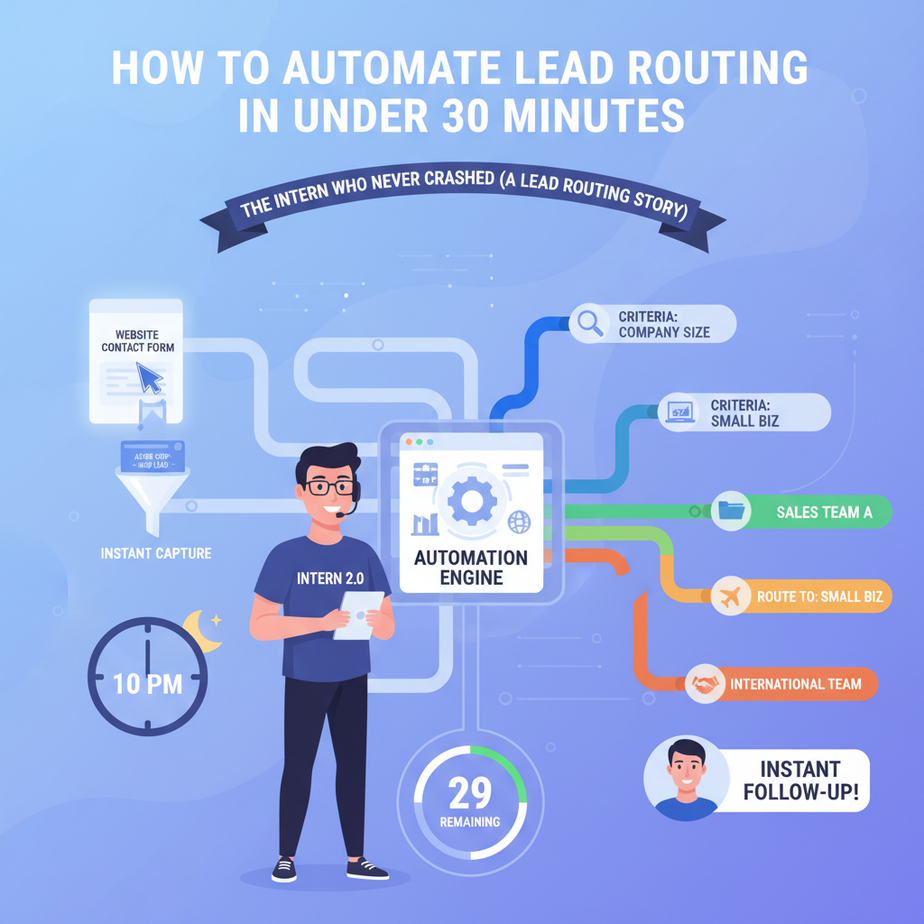
The Intern Who Never Crashed (A Lead Routing Story)
Picture this: It’s 10 PM on a Tuesday. A potential client fills out your website’s contact form. Their company name is “Acme Corp,” they’re in Florida, and they want a quote for your most expensive product. Who gets the lead? Your sales team is already asleep. In the morning, the lead is cold, assigned to the wrong regional salesperson, and ends up in a landfill of lost revenue.
Worse? The salesperson in the Northeast gets it. They spend two days emailing with Acme Corp, only to realize the account is actually for a different division entirely. By the time they transfer the lead, the competitor’s invoice has already been signed.
Enter the Lead Router Bot. It’s the intern that works 24/7, reads the lead form instantly, and routes it to the exact right salesperson—like a GPS for your revenue stream.
Why This Matters: The $4,000-Per-Day Leak
For every 100 leads that come in, about 7 are never contacted within the critical first hour. In a B2B sales team, that’s often worth over $4,000 in lost revenue—per day. By the time you’re old enough to have a sales team, you’ve already burned through enough leads to buy a small yacht.
This automation doesn’t just save time; it optimizes time. It replaces the chaos of manual assignment, the human error of misreading a zip code, and the memory-failing of who handles which industry. It’s a direct pipeline from lead to revenue, with zero friction.
What This Tool Actually Is (And Isn’t)
What it IS: A simple workflow that watches a form submission (like a Google Form, Typeform, or your website’s webhook), parses the key data (company size, location, product interest), and instantly assigns the lead to the right salesperson’s CRM record via an API call or even a notification.
What it IS NOT: It doesn’t replace your sales team’s charm or skill. It doesn’t negotiate prices. It doesn’t write the follow-up email. It’s the warm hand-off, not the entire conversation.
Prerequisites: Zero Panic Zone
You need:
- An account with Zapier or Make.com (the free tier works for this). We’ll use Zapier here for simplicity, but the logic is identical.
- A Google Form (or any form tool you use) as your lead source.
- A shared spreadsheet or a CRM (like HubSpot or Salesforce) to assign leads to. We’ll use a Google Sheet as our “CRM” for this tutorial because it’s free and instantly accessible.
No coding required. This is less complex than ordering a pizza on an app.
Step-by-Step: Building Your Lead Router in 25 Minutes
- Set Up Your Form:
Create a Google Form. Include fields for:Company Name,Contact Email,Industry(dropdown: Tech, Retail, Healthcare, Other),Region(dropdown: Northeast, Midwest, South, West), andProduct Interest. This is your lead source. - Prepare Your “CRM” Sheet:
Create a new Google Sheet. Name it “Lead Router Assignments.” Create these columns:Lead Email,Company,Assigned Sales Rep,Assigned Region,Timestamp. This is where your bot will write the assignment. - Start a Zap in Zapier:
Go to Zapier.com. Create a new Zap. The trigger is “Google Forms” and the event is “New Form Response.” Connect your Google Form. - Test the Trigger:
Go to your form, fill it out with a test entry. Submit it. In Zapier, click “Test Trigger” and you should see your form data pop up. - The “Brain” Step – Router by Region:
Add a new action. Search for “Zapier Filter” (this is a premium feature, but there’s a free version for simple logic). We’ll use the built-in paths. For simplicity, we’ll use a text field in the form response. In Zapier’s editor, click the “Filter” button and set up a condition: “If Region is exactly ‘Northeast’, continue.” This creates a path for Northeast leads. Repeat this for each region, creating different paths. - Assign Sales Reps (The Core Logic):
For each path (e.g., Northeast), add a new action: “Google Sheets” > “Create Spreadsheet Row.” Connect your “Lead Router Assignments” sheet. Map the form fields:Contact Emailto Lead Email,Company Nameto Company, and add a static value for Assigned Sales Rep (e.g., “Alex Chen” for Northeast, “Maria Garcia” for Midwest, etc.). - Turn It On & Test:
Turn your Zap live. Submit a form for each region. Check your Google Sheet. You should see each lead pop in, perfectly assigned.
Copy-Paste Ready Snippet (Conceptual Logic for Custom Code):
If you were building this in code (Python), the routing logic would look like this:
def assign_sales_rep(region, industry):
    assignments = {
        'Northeast': {'Tech': 'Alex Chen', 'Healthcare': 'Sam Lee'},
        'Midwest': {'Retail': 'Maria Garcia', 'Tech': 'James Wilson'},
        'South': {'All': 'Priya Sharma'},
        'West': {'All': 'Kenji Tanaka'}
    }
    rep = assignments.get(region, {}).get(industry, 'Alex Chen')  # default
    return rep
Complete Automation: From Website Form to Sales Alert
Let’s connect this to a real-world notification flow:
1. Trigger: Website form submitted (Typeform or a generic webhook).
2. Action 1: Zapier parses the form data.
3. Action 2: Router Path determines region/industry.
4. Action 3 (Assignment): Creates a row in the shared Google Sheet CRM.
5. Action 4 (Alert): Sends a Slack message to the specific salesperson’s private channel: @AlexChen, you have a new lead: Acme Corp from Northeast (Tech). Email: john@acme.com. Check the CRM sheet.
6. Action 5 (Backup): Also logs the lead in a master “All Leads” sheet for analytics.
This entire flow runs in under 60 seconds, 24/7, with zero human intervention.
5 Real Business Use Cases
- SaaS Startup: The founder gets 30 signups per day. Leads are messy. Router sorts by company size (self-reported) and routes SMBs to a junior AE, enterprise leads to the founder’s Slack, doubling response speed.
- Local Dentist’s Office: New patient requests are forwarded to the office manager based on service (Braces vs. Cosmetic) and the dentist’s availability calendar, reducing missed calls.
- E-commerce Fulfillment Service: Client inquiries are routed based on order volume (Small Business vs. Enterprise) to different account managers, ensuring high-value clients get instant attention.
- Consulting Firm: “Contact Us” forms are routed by industry (Manufacturing, Finance, Tech) to the partner with that specialization, boosting proposal acceptance rates.
- Real Estate Team: Inquiries on a property listing are auto-logged to the agent whose territory matches the listing’s zip code, preventing cross-office conflicts.
Common Mistakes & Gotchas
1. Over-Complicating the Form: Don’t ask 20 questions. Start with 3-5 key fields for routing. If you need more info, get it after the initial assignment.
2. Forgetting the Fallback: Always have a “default” person or channel for leads that don’t match any rule (like “Other” region).
3. Not Testing with Real Data: Test with a dummy email and company name. Nothing’s worse than accidentally emailing a test alert to a real client.
4. Ignoring CRM Limits: If using a free tool, watch for row limits. A small business will be fine; an enterprise needs a real CRM.
How This Fits Into Your Automation Empire
This Lead Router is the entry point of your sales automation pipeline. Here’s how it connects:
– CRM Integration: The Google Sheet can be replaced with a HubSpot or Salesforce Create Record action.
– Email Sequences: Once assigned, a Zap can trigger a personalized welcome email from the sales rep’s address.
– Voice Agents: The assigned rep’s phone can be prompted with a call summary via a parallel automation (like a Twilio + Zapier combo).
– Multi-Agent Workflows: After the hand-off, an AI agent can research the lead’s company on LinkedIn and draft a starter email for the rep to approve.
– RAG Systems: The lead’s data can be ingested into a vector database to power a future chatbot that knows their history.
Think of it as the first domino in a chain that leads to closed deals.
What to Learn Next
You’ve just automated one of the most critical revenue steps in the funnel. Next, we’ll layer on intelligence: How to build an AI Enrichment Bot that automatically pulls a lead’s company size, funding info, and key contacts—then attaches that intel to your lead alert.
It’s the difference between giving your salesperson a name and giving them a full dossier. The next lesson drops next Thursday. Don’t miss it.
“,
“seo_tags”: “business automation, lead routing, Zapier automation, sales workflow, AI for sales”,
“suggested_category”: “AI Automation Courses