
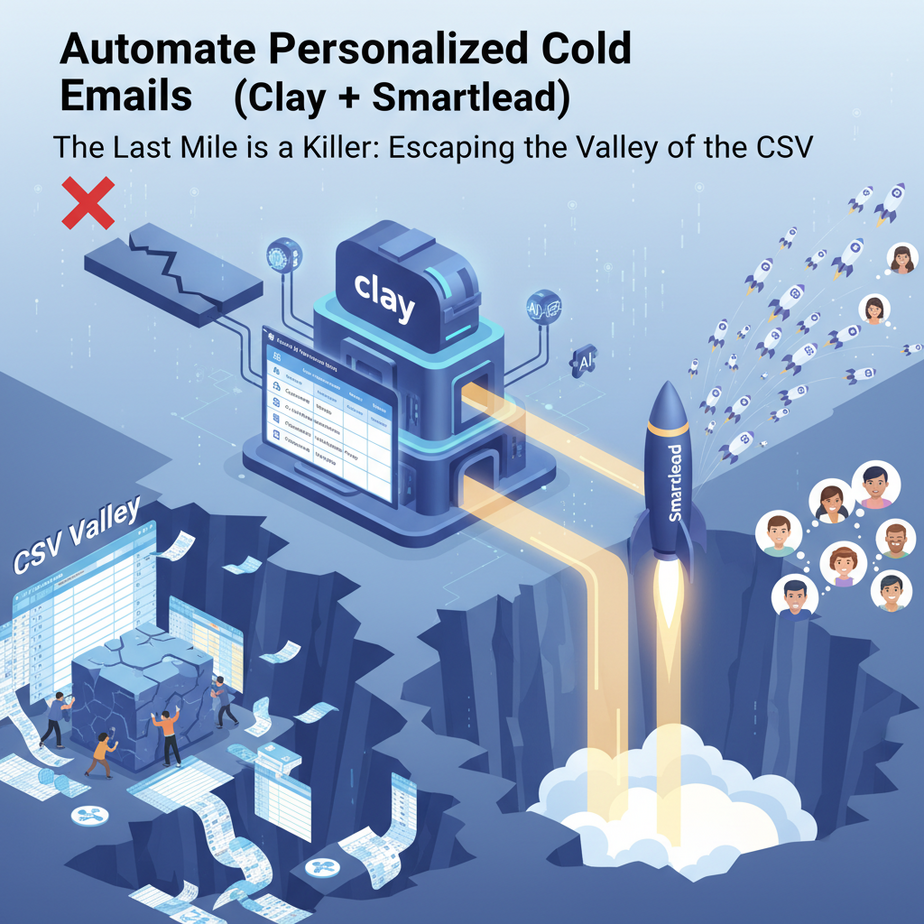
The Last Mile is a Killer: Escaping the Valley of the CSV
In our last lesson, we built a masterpiece. A beautiful, pristine table in Clay, shimmering with verified emails and custom, AI-written opening lines. It’s a work of art. And right now, it’s about as useful as a painting in a locked vault. Because the final, soul-crushing step remains: actually *sending* the emails.
This is what I call the “Valley of the CSV.” It’s that grim no-man’s-land between having perfect data and taking action on it. You click ‘Export to CSV.’ You open a messy file. You try to import it into your email tool, praying the columns match. You map `first_name` to `firstName` and `company` to `company_name`, hoping you got it right. It’s a clunky, error-prone, and deeply uninspiring process. It’s where motivation goes to die.
Today, we pave over that valley. We’re building a direct, high-speed monorail from our data factory in Clay straight to our outbound email engine. No more CSVs. No more manual imports. Just a seamless, instantaneous flow of personalized outreach.
Why This Matters: From Potential Energy to Kinetic Action
Connecting your research tool to your sending tool is the difference between having a power plant and actually turning the lights on. It’s about activating your data.
Scale and Speed: Instead of exporting a list once a week, you can have new, personalized emails going out every single hour. As soon as a new lead matches your criteria, they can be researched and contacted, allowing you to engage with prospects the moment they become relevant.
Eliminating Human Error: Every manual export/import is a chance to mess up a column, mangle a name, or upload the wrong list. An automated connection is ruthlessly consistent. It never gets tired, never mixes up files, and never forgets to map a custom field.
Building a True System: This isn’t just a workflow; it’s a machine. A system that you build once and that continues to generate opportunities for you in the background. It’s the engine of a modern sales or marketing operation, working for you while you focus on closing deals, not fiddling with spreadsheets.
What This Workflow Actually Is: The Secret Hotline (Webhooks)
The magic that connects Clay to our email tool (we’ll use Smartlead, but the logic applies to Instantly, Apollo, etc.) is called a webhook.
Don’t let the techy name scare you. A webhook is just a special URL. Think of it like a private, direct phone number. Our email tool, Smartlead, gives us this secret number. Then, inside Clay, we just tell it, “Hey, whenever a lead is ready, call this number and deliver this package of information.”
When Clay ‘calls’ the number, it sends a payload of data—the lead’s name, email, company, and our custom AI line—directly into the correct campaign in Smartlead. Smartlead hears the phone ring, accepts the package, and immediately puts that lead into the email sequence. It’s an instant, machine-to-machine conversation that bypasses all the manual nonsense.
Prerequisites: Don’t Skip This Section. Seriously.
- A Complete Clay Table: You need the output from our last lesson, or something similar. A table with columns for at least First Name, Email, and your personalized `AI Opening Line`.
- An Email Sending Tool Account: We’ll use Smartlead. The principles are nearly identical for Instantly.io, Apollo, etc. Get an account set up.
- A Warmed-Up Email Address: This is NON-NEGOTIABLE. You cannot connect a brand-new email account and start sending hundreds of emails. Your emails will go straight to spam, and your domain will get blacklisted. You must connect an email address that has been properly ‘warmed up’ for at least 2-3 weeks using the built-in warmup feature of your sending tool. Don’t know what this is? Pause and Google “email warmup.” I am saving you from certain doom.
Step-by-step Tutorial: Building the Data Monorail
Let’s get our hands dirty. Our mission is to send the leads we found in the last lesson into an email campaign, automatically.
Step 1: Prepare the Destination (Set Up Your Smartlead Campaign)
Before we can send data, we need a place for it to go.
- Log in to Smartlead and create a new campaign.
- In the campaign’s email sequence, write your email copy. This is where you’ll use your variables. Your email body might look something like this:
Subject: Quick question about {{companyName}}
Body:
Hi {{firstName}},
{{aiOpeningLine}}
I’m Ajay, and I run an academy that helps businesses automate processes just like this one…
(The rest of your pitch)
- Notice the `{{…}}` variables. We need to tell Smartlead that we’ll be providing data for `firstName`, `companyName`, and our custom one, `aiOpeningLine`. Smartlead handles `firstName` automatically, but we need to define the others. Save your sequence.
Step 2: Get the Secret Phone Number (Your Webhook URL)
Now, we need to tell Smartlead to listen for calls from Clay.
- In your Smartlead campaign, go to the “Add Leads” section.
- Instead of uploading a CSV, choose the option for “API / Webhook.”
- Smartlead will generate a unique URL for this specific campaign. It will look something like `https://api.smartlead.ai/webhooks/v1/add-lead/…`
- Copy this URL. This is your golden ticket. Guard it well.
Step 3: Connect the Factory (Set Up the Webhook in Clay)
Time to jump back into our Clay table.
- Add a new column to your table. Call it “Send to Smartlead.”
- Choose “Enrich Data” for the column type.
- In the search bar for integrations, type “Webhook” and select the “Send to Webhook” option.
Step 4: Pack the Boxes (Map Your Data Fields)
This is the most critical step. We need to tell Clay *what* data to send and *how* to format it. The webhook integration will have a few fields to fill out.
- URL: Paste the webhook URL you copied from Smartlead here.
- Method: Make sure this is set to POST.
- Body: This is where we format our data package using JSON. Don’t worry, it’s simpler than it looks. We need to match the field names that Smartlead expects. Click on the “JSON” tab and paste the following structure.
{
  "api_key": "YOUR_SMARTLEAD_API_KEY",
  "email": "",
  "first_name": "",
  "custom_variables": {
    "companyName": "",
    "aiOpeningLine": ""
  }
}
- First, replace `YOUR_SMARTLEAD_API_KEY` with your actual API key from your Smartlead settings.
- Now, we’ll map our Clay columns to the empty quotes. Place your cursor inside the quotes and type `@` or `{{` to bring up your list of columns. Map them like this:
{
  "api_key": "sl_your_real_api_key_goes_here_12345",
  "email": "{{Verified Work Email}}",
  "first_name": "{{First Name}}",
  "custom_variables": {
    "companyName": "{{Company Name}}",
    "aiOpeningLine": "{{AI Opening Line}}"
  }
}
This structure tells Smartlead: Here is the lead’s email. Here is their first name. And here is a bundle of custom stuff, including their company name and the special AI line we wrote.
Step 5: Test Fire and Launch!
NEVER run an automation on your whole list without testing.
- In the webhook column, find the “Run” button for a single row. Click it.
- Go back to your Smartlead campaign and check the “Leads” tab. In a few seconds, you should see your single test lead appear, with all the custom data correctly populated.
- If it worked, congratulations! You’ve built the monorail. Now you can confidently run the webhook enrichment for all the rows in your table.
Real Business Use Cases (This is a Superpower)
- Evergreen Lead Generation: Set your Clay table to run your LinkedIn search every day for new results. As Clay finds and enriches new leads, the webhook automatically pushes them into your email campaign. You have a lead generation machine that never sleeps.
- Automated Job Applicant Outreach: Scrape new applicants for a role from a job board into Clay. Enrich their profiles, find their personal emails, and use a webhook to send them to a campaign that confirms their application and provides next steps.
- Podcast Guest Booking: Find hosts of podcasts in your niche. Use AI in Clay to generate a personalized pitch based on their recent episodes. Use the webhook to send them to a hyper-personalized outreach sequence in Smartlead.
Common Mistakes & Gotchas (The Monorail Derailment Guide)
- API Key vs Webhook URL: Don’t mix these up. The URL tells Clay *where* to send the data. The API key in the body proves *who* is sending it. You need both.
- Variable Mismatch Hell: If you use `{{aiOpeningLine}}` in your email copy, the variable in your JSON *must* be named `”aiOpeningLine”`. If they don’t match perfectly (including case), it will fail, and your email will look broken.
- Not Checking for Success: After running the webhook, Clay will show a “Success” or “Error” message. If you get an error, click on it. It will show you the response from Smartlead, which usually tells you exactly what went wrong (e.g., “Duplicate Email” or “Invalid API Key”).
How This Fits Into a Bigger Automation System
We’ve now connected two massive pillars of our automation empire: Research (Clay) -> Outreach (Smartlead). The factory is now producing goods and shipping them to customers. But what happens when the customers reply?
The next layer is Reply Management. Our inbox is about to get busy. A truly advanced system doesn’t stop at sending. It needs to:
1. Read incoming replies.
2. Classify them (Interested, Not Interested, Question, Out of Office).
3. Take action based on the classification (e.g., alert a human in Slack for interested leads, automatically unsubscribe others).
What to Learn Next
Our autonomous outreach machine is online. Leads are being contacted, and replies are starting to trickle in. But right now, a human—you—is still the bottleneck for reading and responding. This is inefficient.
What if an AI could be your inbox’s gatekeeper? What if it could read every reply, understand the intent, and then tell you *only* about the hot leads that need your attention? That’s not science fiction; that’s our next lesson.
In the next post, we will use AI to triage your inbox. We will build a system that automatically classifies email replies, drafts responses, and turns your chaotic inbox into a clean, intelligent pipeline. The factory is running; next, we automate the front office.
“,
“seo_tags”: “cold email automation, Clay webhook, Smartlead automation, personalized email, AI sales, lead nurturing, connect Clay to Smartlead”,
“suggested_category”: “AI Automation Courses